Geometry Rush Level Editor Arcade
Reviews
Geometry Rush with Level Editor offers a satisfying mix of reflex-based jumping and creative level design. The core game is straightforward: guide a cube through a geometric obstacle course by timing jumps to avoid spikes and land on safe platforms. The built-in level editor sets it apart, letting you build and test your own courses. This feature encourages experimentation and extends replayability significantly. The controls are precise, and the visual style is clean and easy to read. It is a well-rounded arcade game that appeals to both casual players and those who enjoy designing puzzles.
About this game
Game Introduction
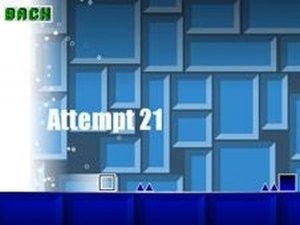
Geometry Rush with Level Editor is an online arcade game that challenges players to navigate a small cube through a vibrant geometric world. The cube moves forward automatically, and your goal is to avoid red spikes and sharp triangles that end your run if touched. You must also land on helpful cubes to climb higher and advance. Each obstacle you pass adds to your score. The game stands out with its built-in level editor, allowing you to place geometric shapes anywhere on the course. You can design unique levels and then test your ability to complete them. This combination of reflex-based action and creative level building offers a fresh experience for players who enjoy puzzles and fast-paced challenges.
How to Play
To play, click or tap to make your cube jump. Time your jumps carefully to avoid red spikes and sharp triangles, which are traps that stop your progress. Look for friendly cubes that help you go up and forward—these are safe and beneficial. The more obstacles you pass, the higher your score. In the level editor mode, drag and drop various geometric shapes onto the course to design your own path. After building your level, play it to see if you can complete it. The controls are simple to learn, but mastering the timing and level design takes practice, providing endless replayability.
Game Features
Creative level editor lets you design custom courses. Simple one-click controls make it easy to start playing. Endless geometric challenges keep each session fresh. Levels can be saved and replayed to improve your score.
Tips for Success
Practice timing your jumps to navigate tricky courses. Start with simpler levels to build muscle memory before attempting complex designs. Use the level editor to create practice runs focusing on specific obstacles. Experiment with different geometric arrangements to discover efficient paths. Regular play helps improve reflexes and pattern recognition.